Laravel – Response
A web application responds to a user’s request in many ways depending on many parameters. This chapter explains you in detail about responses in Laravel web applications.
Basic Response
Laravel provides several different ways to return response. Response can be sent either from route or from controller. The basic response that can be sent is simple string as shown in the below sample code. This string will be automatically converted to appropriate HTTP response.
Example
Step 1 − Add the following code to app/Http/routes.php file.
app/Http/routes.php
Step 2 − Visit the following URL to test the basic response.
Step 3 − The output will appear as shown in the following image.

Attaching Headers
The response can be attached to headers using the header() method. We can also attach the series of headers as shown in the below sample code.
Example
Observe the following example to understand more about Response −
Step 1 − Add the following code to app/Http/routes.php file.
app/Http/routes.php
Step 2 − Visit the following URL to test the basic response.
Step 3 − The output will appear as shown in the following image.

Attaching Cookies
The withcookie() helper method is used to attach cookies. The cookie generated with this method can be attached by calling withcookie() method with response instance. By default, all cookies generated by Laravel are encrypted and signed so that they can’t be modified or read by the client.
Example
Observe the following example to understand more about attaching cookies −
Step 1 − Add the following code to app/Http/routes.php file.
app/Http/routes.php
Step 2 − Visit the following URL to test the basic response.
Step 3 − The output will appear as shown in the following image.
JSON Response
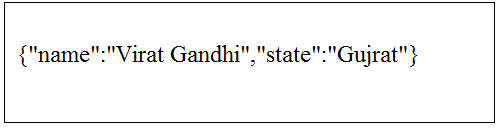
JSON response can be sent using the json method. This method will automatically set the Content-Type header to application/json. The jsonmethod will automatically convert the array into appropriate json response.
Example
Observe the following example to understand more about JSON Response −
Step 1 − Add the following line in app/Http/routes.php file.
app/Http/routes.php
Step 2 − Visit the following URL to test the json response.
Step 3 − The output will appear as shown in the following image.